As an NHS GP practice, if you accept incoming referrals from other services for NHS commissioned care, you can correctly record this as a registration type of 'Referral In' and discharge the patient when care has ended. You can also:
- Accept referrals electronically from other SystmOne services - Streamlining the registration process in these cases
- Have Caseloads to access the active lists (especially useful if you accept referrals for a multiple reasons e.g. Minor Surgery and Contraceptive services)
IMPORTANT: Note that this is a patient type that will need to have care ended manually: How do I remove a Private/Referred/Other patient from SystmOne?
Steps
Your service System Administrator will:
- Configure Lists
- Enable incoming electronic referrals and create Task Rule
- Validate 'Consultation Summary Messaging' is enabled
1. Configure Lists
Note: List options selected for 'Statuses' and 'Outcome' are shared with outgoing referral functionality. Ensure you have suitable options available to cover both outbound and inbound referrals for your service based on your local policy.
- Navigate to Configured Lists
- Navigate to and select the list item you wish to amend and use Configure List
- Move items to/from the Permitted Options section as per your needs
The example below shows Referrals > Admission/Discharge Location list being configured with Back to Referrer as the sole permitted list item:
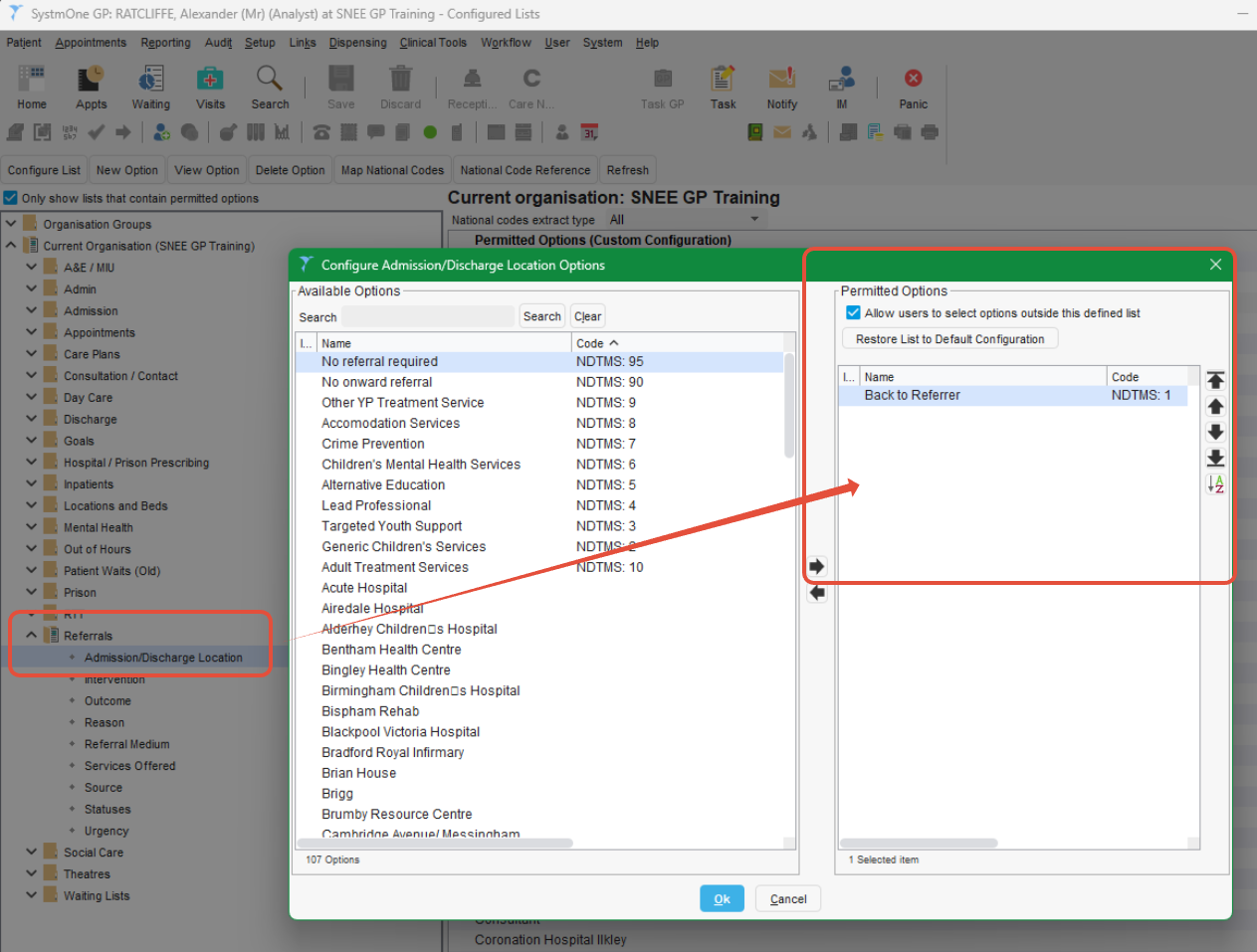
For incoming referrals; the following lists should be configured to your service needs within the Referrals category:
- Admission/Discharge Location
- Intervention
- Outcome - Note: This also impacts the options your staff can record to add status updates against outgoing referrals, ensure you have adequate options for admin/medical secretaries to use.
- Reason
- Services Offered
- Source
- Statuses - Note: This also impacts the options your staff can record to add status updates against outgoing referrals, ensure you have adequate options for admin/medical secretaries to use.
- Urgency
2. Enable incoming referrals and create Task Rule
This option allows other SystmOne services to send patient records to your service, removing registration steps from your own service. The Referrals will arrive as 'Electronic Referral Received' Tasks for your service to accept/reject as appropriate. Thet Task Rule ensure that incoming electronic referrals are directed to the responsible staff at your service.
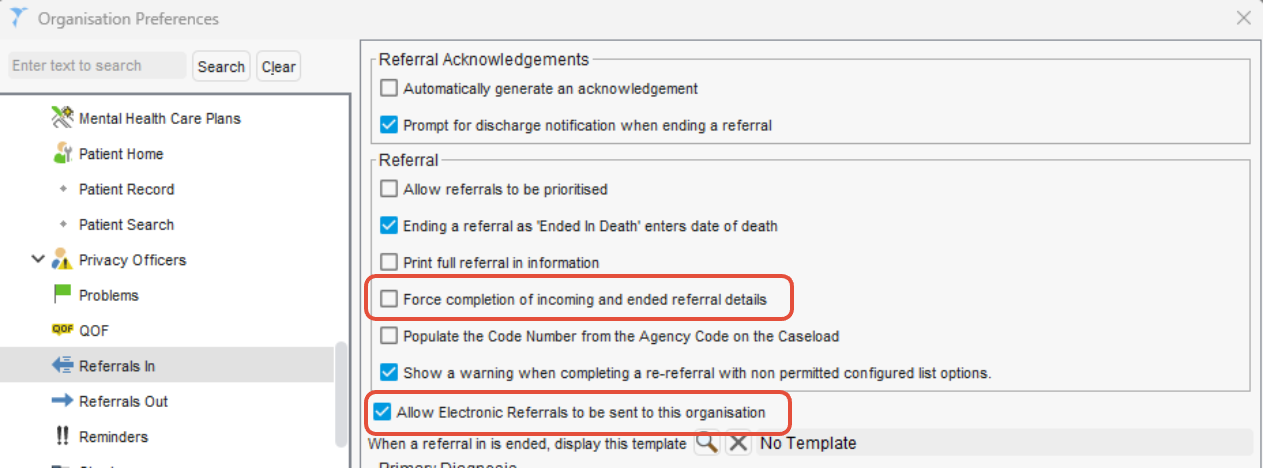
Within Organisation Preferences
- In node Referrals In
- Disable 'Force completion of incoming and ended referral details' (This simplifies the 'Referral In' screen, selecting the first item automaically on most lists)
- Enable 'Allow Electronic Referrals to be sent to this organisation'
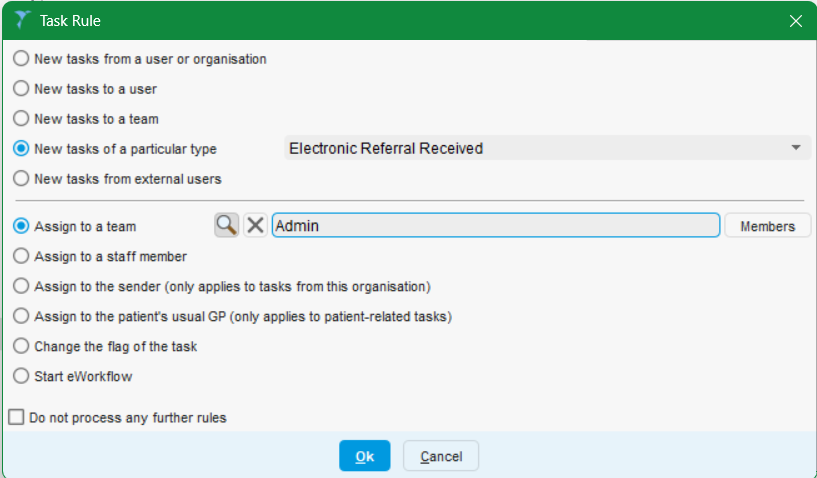
- In node Tasks > Rules (If you do not already have a rule for 'Electronic Referral Received')
Create a New Rule
For particular type: Electronic Referral Received
And assign to the relevant Team (or the outdated 'User Group' if your service has not updated since 2022)
3. Validate 'Consultation Summary Messaging' is enabled
Consultation Summary Messaging ensures that when your service provides non‑GMS care, the patient’s registered GP surgery automatically receives a copy of the clinical information you record. This supports continuity of care and ensures the GMS practice holds an accurate record.
What to check
- 'Enable sending consultation summaries'
- 'Send to all practices' (recommended) - This helps ensure that all actions are reliably delivered to the patient’s registered GP.
Read more about this functionality in Help > Support & FAQs > Documents & Training Guides: GPCConsultationSummaries
Why would we send summaries to SystmOne practices?
There are several situations where shared record access between SystmOne organisations may become unavailable or restricted. It would be unsafe to rely solely on shared record access to ensure the registered GMS surgery is kept informed and can continue to access this information to make clinical decisions.
If you become aware of any SystmOne service relying exclusively on shared record visibility, e.g. not sending clinic letters, discharge letters, or consultation summaries to the patient’s registered practice, we recommend raising this with your service clinical safety and governance leads. They should ensure that appropriate information flows are occuring and that the registered practice continues to receive the data it is responsible for holding.