These patient types of registrations are indefinite relying on your procesesed to ensure they are removed.
Having confirmed your care responsibility has ended:
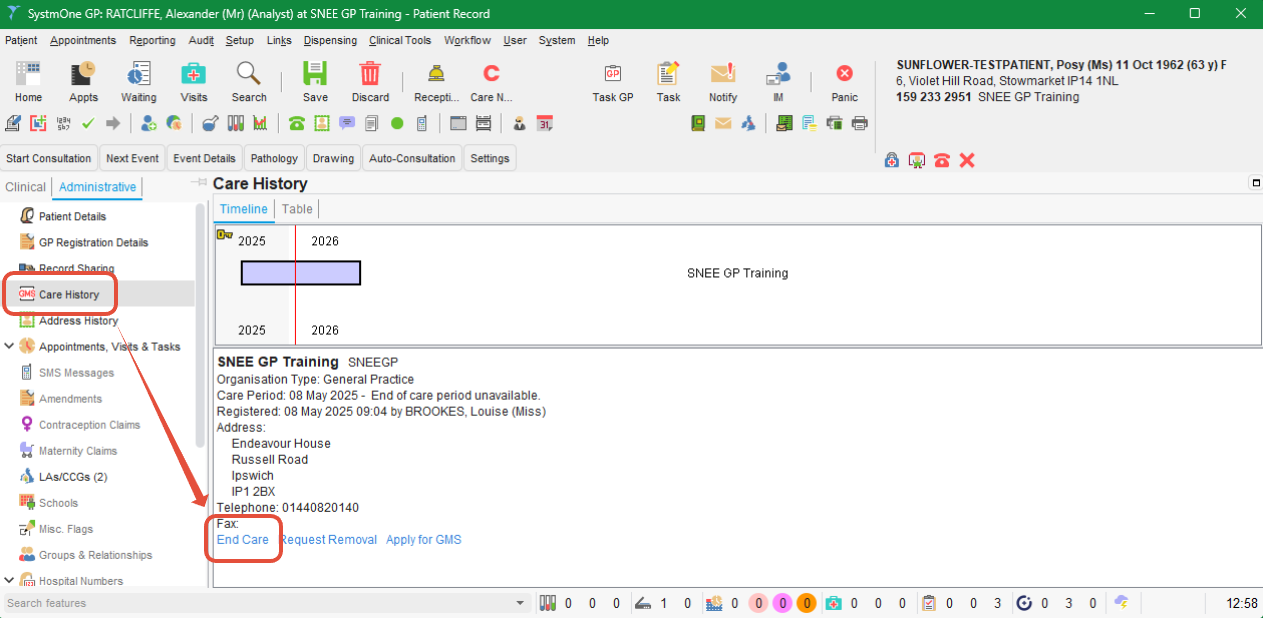
- Navigate to the patient's Care History node (by default, available on the Administrative tree)
- Select End Care
- Save the record
Note this is immediate as there is no external service involved.
Suggestions
Having patinets remain active in your service after care has ended can result in inaccurate reports/registers (unecessary work), data quality issues, and governance risks. To help avoid this:
Have a process set for each type of registration and care type to be removed manually. This might include setting a date to end care X days after a final procedure is complete. This delay allows time should the patient reach out for follow-up or complications/concerns following your care.
Run regular searches to safety net those that may have been missed in your default process.
Patient types typically removed automatically
| Patient Type | Description | Automatic Removal Trigger |
|---|---|---|
| GMS / “Regular” Patients | Fully registered patients | When they register with another practice, are recorded as deceased, or are confirmed as living outside the practice area. This includes surgeries requesting deduction, after which the patient is automatically removed by the health authority (PCSE). |
| Temporary Residents (Temporary GMS) | Short-term registrations | Automatically deducted after 3 months |
| Immediately Necessary Treatment (INT) (Urgent/Emergency Treatment) | Patients treated without registration | Automatically deducted after 14 days |
For these categories, no manual action is required unless there is a system issue.